Sketch template
void setup() {
  size(800, 600);
  smooth();
}

void draw() {
  background(250);
  // draw your art here
}
void setup() {
size(800, 600);
smooth();
}
void draw() {
background(250);
// draw your art here
}
// Program structure basics:
// - setup() runs once at program start; typically used for program settings.
// - draw() runs repeatedly (~60 FPS by default) until the program closes.
//   Each iteration renders a new frame, enabling motion and animation.
// - Graphics are usually drawn in draw(), but some one-time drawing/setup can
//   also be done in setup() when appropriate.

void setup() {
  // Runs once at startup — define window and global settings here
  size(800, 500);
  pixelDensity(displayDensity());
  colorMode(HSB, 360, 100, 100);
}

void draw() {
  // Runs repeatedly after setup(); draws a new frame each time (~60 fps)
  background(0, 0, 100);  // clear previous frame (white in HSB)
  fill(0, 0, 0);          // black fill for shapes
  ellipse(200, 200, 200, 200); // circle: x, y, width, height
}
The code inside setup() runs once when the program starts. This section is typically used to define program settings.
The code inside draw() runs after setup() repeatedly until the program is closed. After each iteration, the drawn content appears on the screen (normally ~60 times per second), enabling motion effects.
Typically, graphics are drawn in draw(), but for some effects it can be convenient to place drawing code in setup() as well.
void setup() {
  // Create window (width, height) in pixels
  size(800, 500);

  // Use full resolution on Retina/HiDPI displays
  pixelDensity(displayDensity());

  // Prefer HSB color mode (easier to reason about than RGB for many tasks)
  colorMode(HSB, 360, 100, 100);
}

void draw() {
  // Clear the frame at the start of each iteration
  background(0, 0, 100);

  // Draw a black circle as an example
  fill(0, 0, 0);
  ellipse(200, 200, 200, 200);
}
size(width, height) creates the window and sets its size in pixels. An alternative is fullScreen().
The pixelDensity() function lets you leverage Retina/HiDPI screen resolution.
It is often useful to set the color mode to HSB, which is easier for humans to reason about. Colors are RGB by default.
void setup() {
  size(800, 500);
  pixelDensity(displayDensity());
  colorMode(HSB, 360, 100, 100);
}

void draw() {
  background(0, 0, 100);
  fill(0, 0, 0);
  ellipse(200, 200, 200, 200);
}
background() paints the whole screen with a single color. A background() call at the start of draw() clears the previous frame before drawing the new one.
fill() changes the fill color used for subsequent shapes.
ellipse() draws an ellipse. The first two numbers set the center x/y coordinates, and the next two set width and height.
One self-contained sketch that demonstrates essential drawing keywords: stroke, strokeWeight, noStroke, fill, noFill, line, rect, ellipse, and triangle.
void setup() {
  size(800, 500);
  pixelDensity(displayDensity());
  colorMode(HSB, 360, 100, 100);
}

void draw() {
  background(0, 0, 100);

  // 1) Line with stroke and strokeWeight
  stroke(0, 0, 0);
  strokeWeight(4);
  line(60, 80, 220, 80);

  // 2) Filled rectangle without outline
  noStroke();
  fill(200, 80, 80);
  rect(60, 120, 160, 80);

  // 3) Ellipse outline without fill
  stroke(0, 0, 0);
  noFill();
  ellipse(300, 160, 120, 120);

  // 4) Triangle with fill and thin outline
  fill(40, 90, 100);
  stroke(0, 0, 0);
  strokeWeight(2);
  triangle(430, 200, 520, 80, 610, 200);

  // 5) Outlined rectangle with colored stroke, no fill
  noFill();
  stroke(210, 80, 60);
  strokeWeight(6);
  rect(60, 240, 160, 80);

  // 6) Column of vertical lines with increasing thickness
  stroke(0, 0, 0);
  for (int i = 0; i < 5; i++) {
    strokeWeight(1 + i * 1.5);
    line(260 + i * 20, 240, 260 + i * 20, 320);
  }
}
Demonstrates custom polygons with beginShape()/endShape() and arcs with different modes.
// Polygon + Arc demonstration — run as-is
// Shows a custom polygon (star) and multiple arc variants (OPEN, CHORD, PIE)

void setup() {
  size(800, 500);
  pixelDensity(displayDensity());
  colorMode(HSB, 360, 100, 100);
  smooth();
}

void draw() {
  background(0, 0, 100); // clear frame

  // --- Left: arcs with different modes ----------------------------------------------------
  // Base circle for context
  noStroke();
  fill(200, 80, 80);
  ellipse(width * 0.25, height * 0.45, 180, 180);

  // OPEN arc (default): just the curved outline
  noFill();
  stroke(200, 80, 60);
  strokeWeight(6);
  // arc(x, y, w, h, startAngle, stopAngle) — angles in radians
  arc(width * 0.25, height * 0.45, 180, 180, -PI/3, PI/2);

  // CHORD arc: arc edge is closed with a straight chord
  stroke(330, 70, 70);
  strokeWeight(4);
  arc(width * 0.25, height * 0.45, 140, 140, PI * 0.6, PI * 1.2, CHORD);

  // PIE arc: sector shape (like a slice of pie)
  stroke(120, 70, 70);
  strokeWeight(2);
  fill(120, 50, 90, 60); // semi-transparent fill
  arc(width * 0.25, height * 0.45, 100, 100, -PI * 0.2, PI * 0.4, PIE);

  // --- Right: custom polygon (star) -------------------------------------------------------
  pushMatrix();
  translate(width * 0.68, height * 0.52);
  noFill();
  stroke(0, 0, 0);
  strokeWeight(2);

  // Create a 10-point star by alternating radius values
  beginShape();
  for (int i = 0; i < 10; i++) {
    float a = TWO_PI * i / 10.0;        // angle around the circle
    float r = (i % 2 == 0) ? 100 : 45;  // alternate long/short radius
    float x = r * cos(a);
    float y = r * sin(a);
    vertex(x, y);
  }
  endShape(CLOSE);
  popMatrix();

  // Tips:
  // - beginShape(); vertex(x, y); ... endShape(CLOSE); — define arbitrary polygons
  // - arc(..., mode): modes are OPEN (default), CHORD, PIE
}
Click a thumbnail to toggle the matching code example. (examples from "Kooditaidetta" by Felix Bade, 16 April 2019.)
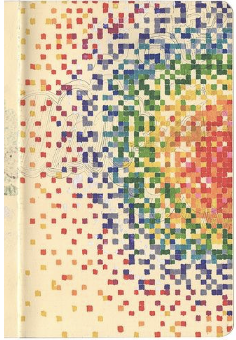
// Dots (pallukat) — random colored dots across the canvas
// setup() runs once at startup
void setup() {
  size(800, 500);                         // Window size in pixels
  pixelDensity(displayDensity());         // HiDPI/Retina resolution support
  colorMode(HSB, 360, 100, 100);          // HSB color space (hue 0..360, sat/bright 0..100)
  background(0, 0, 100);                  // White background in HSB
}

// draw() runs ~60 times per second; each frame draws one new dot
void draw() {
  // Random position for the dot
  float x = random(width);
  float y = random(height);

  // Hue based on distance to a focal point (700, 250) with a small random jitter
  float hue = (dist(x, y, 700, 250) + random(-30, 30)) % 360;

  // Random saturation and brightness for variety
  float saturation = random(50, 100);
  float brightness = random(50, 100);

  // Draw a dot with no outline
  noStroke();
  fill(hue, saturation, brightness);

  // Random dot size
  float diameter = random(5, 20);
  ellipse(x, y, diameter, diameter);
}
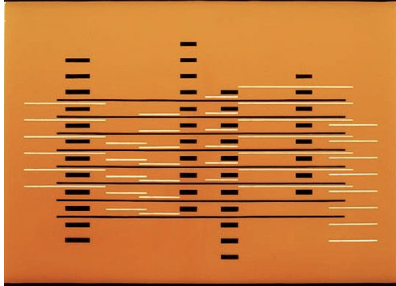
// Stripe family (raitaperhe) — wide random vertical stripe + a horizontal line pattern
// setup(): configure canvas and color space once
void setup() {
  size(800, 500);                         // Canvas size
  pixelDensity(displayDensity());         // HiDPI/Retina support
  colorMode(HSB, 360, 100, 100);          // HSB color space (hue 0..360, sat/bright 0..100)
  background(0, 0, 100);                  // White background
}

// draw(): each frame adds one vertical stripe and one horizontal line pattern
void draw() {
  noStroke();

  // 1) A random vertical stripe with warm color
  fill(30, 90, 100);                      // Orange/yellow stripe
  float x = random(width);                 // Random x position
  float w = random(10, 100);               // Random stripe width
  rect(x, 0, w, height);

  // 2) A short horizontal line pattern at a random position
  float patternX = random(width);
  float patternY = random(height);

  // Choose black or white lines randomly
  if (random(1) < 0.5) {
    fill(0, 0, 0);                         // Black lines
  } else {
    fill(0, 0, 100);                       // White lines
  }

  // Random line thickness
  float thickness = random(1, 4);

  // Draw 5–15 horizontal lines, spaced by 10 px
  for (int i = 0; i < int(random(5, 15)); i++) {
    float shapeY = patternY + i * 10;
    rect(patternX, shapeY, 200, thickness); // Short horizontal rectangle as a line
  }
}

// Sweep (pyyhkäisy) — vertical lines with center‑biased density and slight jitter
// setup() runs once — configure canvas and color space
void setup() {
  size(800, 500);                         // Canvas size
  pixelDensity(displayDensity());         // HiDPI/Retina support
  colorMode(HSB, 360, 100, 100);          // HSB color space (hue 0..360, sat/bright 0..100)
  background(0, 0, 100);                  // White background (HSB)
}

// draw() runs ~60 fps — each frame draws one vertical line near the center band
void draw() {
  // Base x in the middle region; adjust the range to widen/narrow the band
  float x = random(300, 500);

  // Add small horizontal jitter for a hand‑drawn look
  float spread = 35;
  float x1 = x + random(-spread, spread); // top endpoint x
  float x2 = x + random(-spread, spread); // bottom endpoint x

  // Probability favors colored strokes near canvas center (x ≈ 400)
  // As |x-400| grows, pow((x-400)/100, 2) increases → more likely to draw white
  if (random(1) > pow((x - 400) / 100.0, 2)) {
    stroke(20, 100, 10);                  // Greenish colored line (HSB)
  } else {
    stroke(0, 0, 100);                    // White line (acts as highlight/erase)
  }

  // Slightly vary thickness for texture
  strokeWeight(random(1, 3));

  // Draw the full‑height vertical line
  line(x1, 0, x2, 500);
}
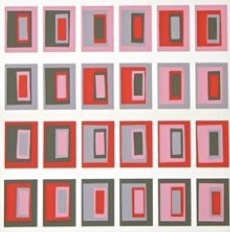
// Concentric boxes — alternating black/white and colored squares with slight jitter
// setup(): configure canvas and color space once
void setup() {
  size(800, 500);                         // Canvas size
  pixelDensity(displayDensity());         // HiDPI/Retina support
  colorMode(HSB, 360, 100, 100);          // HSB color space (hue 0..360, sat/bright 0..100)
  background(0, 0, 100);                  // White background
}

// draw(): each frame draws a stacked set of 10 squares centered on the canvas
void draw() {
  for (int i = 0; i < 10; i++) {
    noStroke();                           // No outline for clean blocks

    // Alternating fill scheme:
    // even i → grayscale (alternating black/white every 2 steps)
    // odd i  → random hue in a blue/teal range
    if (i % 2 == 0) {
      if (i % 4 == 0) {
        fill(0, 0, 0);                    // Black
      } else {
        fill(0, 0, 100);                  // White
      }
    } else {
      float hue = random(150, 210);       // Blue/teal hues
      float saturation = random(50, 100);
      float brightness = random(50, 100);
      fill(hue, saturation, brightness);
    }

    // Map i → size, large to small, plus a small random jitter for organic feel
    float size = map(i, 0, 9, 400, 0) + random(-20, 20);

    // Center squares at (400, 250)
    float x = 400 - size / 2;
    float y = 250 - size / 2;

    rect(x, y, size, size);
  }
}

// Animated Perlin-noise terrain (heightmap) rendered as triangle strips in 3D
int cols, rows;        // grid resolution in columns/rows
int scl = 20;          // grid cell size (pixels)
int w = 1200;          // total terrain width in world units
int h = 900;           // total terrain height in world units
float flying = 0;      // noise offset over time (moves the terrain like waves)

float [][] terrain;    // height values at each grid point

void setup(){
  size(600, 600, P3D);
  cols = w / scl;
  rows = h / scl;
  terrain = new float[cols][rows];
}

void draw() {
  // 1) Update heightfield using 2D noise with a moving y-offset
  flying -= 0.01;                 // move "up" through noise space
  float yoff = flying;
  for (int y = 0; y < rows; y++) {            // row after row
    float xoff = 0;
    for (int x = 0; x < cols; x++) {          // column after column
      // noise(xoff, yoff) in [0..1] → map to height [-50..50]
      terrain[x][y] = map(noise(xoff, yoff), 0, 1, -50, 50);
      xoff += 0.1;                             // step in noise space along x
    }
    yoff += 0.1;                               // step in noise space along y (next row)
  }

  // 2) Render the mesh as a set of triangle strips, one strip per row
  background(0);
  stroke(255);
  noFill();

  // Move scene so the mesh is centered and tilted for perspective
  translate(width/2, height/2 + 50);
  rotateX(PI/3);
  translate(-w/2, -h/2);

  for (int y = 0; y < rows - 1; y++) {        // for each strip between row y and y+1
    beginShape(TRIANGLE_STRIP);
    for (int x = 0; x < cols; x++) {          // stitch vertices across the strip
      vertex(x * scl, y * scl,     terrain[x][y]);
      vertex(x * scl, (y+1) * scl, terrain[x][y+1]);
    }
    endShape();                                // close current strip (one per row)
  }
}
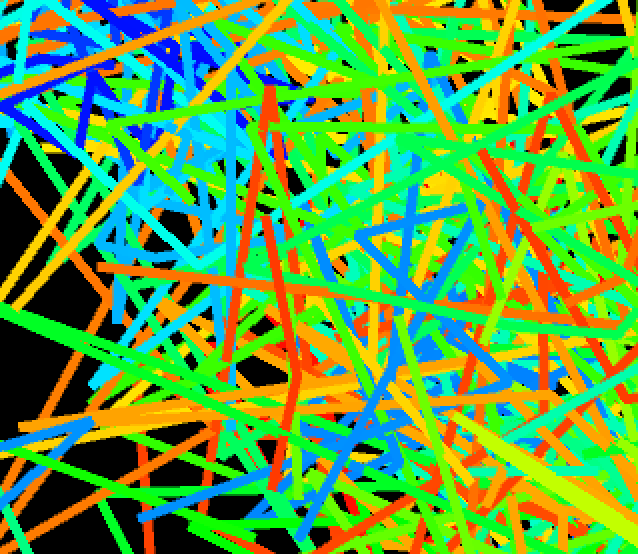
// Lorenz attractor in 3D using simple Euler integration // Parameters (classic): sigma=a=10, rho=b=28, beta=c=8/3 // dx/dt = a(y - x), dy/dt = x(b - z) - y, dz/dt = xy - c z // Camera: PeasyCam for orbit/zoom interaction import peasy.*; float x = 0.1; float y = 0; float z = 0; float a = 10; float b = 28; float c = 8/3.0; // ensure float division ArrayListpoints = new ArrayList (); PeasyCam cam; void setup(){ size(800, 600, P3D); colorMode(HSB); cam = new PeasyCam(this, 500); // start with camera 500 units away } void draw(){ background(0); // Integrate one timestep with a small dt (explicit Euler) float dt = 0.01; float dx = (a * (y - x)) * dt; float dy = (x * (b - z) - y) * dt; float dz = (x * y - c * z) * dt; x += dx; y += dy; z += dz; // Build the polyline of visited points translate(0, 0, -80); points.add(new PVector(x, y, z)); scale(5); stroke(255); noFill(); float hu = 0; // animate hue along the trail beginShape(); for (PVector v : points) { stroke(hu, 255, 255); vertex(v.x, v.y, v.z); // Optional tiny random diffusion to add texture to the line PVector offset = PVector.random3D(); // random unit vector offset.mult(0.2); // reduce randomness amplitude v.add(offset); // perturb the stored point slightly hu += 0.1; if (hu > 255) { hu = 0; } } endShape(); // Note: points grows indefinitely; consider limiting length in long runs. }
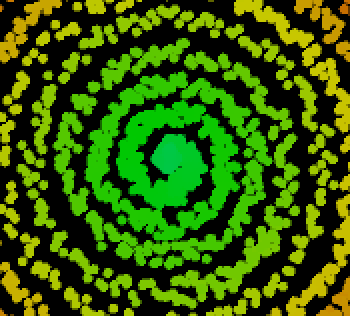
// Mandala-like parametric drawing in 3D
// Concept: Use polar coordinates with a radius that slowly changes with hu and a small random jitter.
// The point (x(t), y(t), z(t)) is plotted each frame around the center; over time it forms a mandala.
float t = 0;     // time parameter (angle driver)
float hu = 0;    // hue also influences the radius

void setup(){
  size(800, 600, P3D);
  colorMode(HSB);
  background(0);
}

void draw(){
  translate(400, 300, 0);       // draw around canvas center
  stroke(hu, 255, 200);
  strokeWeight(5);
  point(x(t), y(t), z(t));      // plot one point on each frame

  // advance parameter and hue
  t++;
  hu = hu + 0.05;               // slow hue drift (also reduces radius below)
  if (hu > 100){
    hu = 0;                     // wrap hue to keep radius in a nice range
  }
}

// x(t): radius varies with hu and a small random jitter; angle = i/30
float x (float i){
  return (100 - hu - random(-2, 5)) * sin(i / 30);
}

// y(t): same radius/angle logic as x; reset t periodically to keep shape bounded
float y (float j){
  if (t > 600){
    t = 0.2;
  }
  return (100 - hu - random(-2, 5)) * cos(j / 30);
}

// z(t): gentle vertical oscillation to give the pattern some depth
float z (float t){
  return 10 * cos(t / 30) + 200;
}
Audio‑based sketches and examples will appear here (sound synthesis, sampling, FFT/visualization).

// Sine sweep with mouse — requires Processing Sound library
// Sketch → Import Library → Add Library… → search "Sound" and install

import processing.sound.*;

SinOsc tone;

void setup() {
  size(800, 500);
  colorMode(HSB, 360, 100, 100);
  background(0, 0, 100);

  tone = new SinOsc(this);
  tone.amp(0.2);
  tone.freq(220); // start at A3
  tone.play();
}

void draw() {
  // Map mouseX to frequency range 110 Hz .. 880 Hz
  float freq = map(mouseX, 0, width, 110, 880);
  tone.freq(freq);

  // Minimal visual feedback (bar height tracks frequency)
  background(0, 0, 100);
  noStroke();
  fill(200, 80, 80);
  float h = map(freq, 110, 880, 40, 300);
  rect(width * 0.1, height * 0.7 - h, width * 0.8, h);
}

void mousePressed() {
  tone.stop();
}

void mouseReleased() {
  tone.play();
}

// HemiSync / Binaural Beats — headphone-only demo
// Left and right ears receive slightly different tones: baseFreq ± beatFreq/2
// The brain perceives the difference (beat) as a low-frequency modulation (0..5 Hz)
// Requires Processing Sound library (Sketch → Import Library → Add Library → search "Sound")

import processing.sound.*;

SinOsc leftSine;
SinOsc rightSine;

float baseFreq = 0;     // Base tone frequency (Hz)
float minFreq = 0;      // Minimum frequency (Hz)
float maxFreq = 6000;   // Maximum frequency (Hz) — capped at 6 kHz
float beatFreq = 2.0;   // Binaural beat (0..5 Hz)
float maxBeatFreq = 5.0;
float leftVolume = 0.0;   // Left ear volume (0..1)
float rightVolume = 0.0;  // Right ear volume (0..1)
boolean isPlaying = false;

void setup() {
  size(800, 600);
  background(240);
  textAlign(CENTER);

  leftSine = new SinOsc(this);
  rightSine = new SinOsc(this);

  println("Binaural beats test ready");
  println("Use top slider for beat (0..5 Hz), bottom slider for base frequency");
  println("Left/Right vertical sliders control ear volumes. Click button to start/stop.");
}

void draw() {
  background(240);

  // Title
  fill(50);
  textSize(24);
  text("BINAURAL BEATS (HEADPHONES)", width/2, 50);

  // UI: beat, frequency, volumes, and start/stop button
  drawBeatSlider();
  drawFrequencySlider();
  drawVolumeSliders();
  drawTestButtons();

  // Status text
  textSize(18);
  if (isPlaying) {
    fill(255, 100, 100);
    text("PLAYING — Do you perceive the beat?", width/2, 250);
  } else {
    fill(50);
    text("Not playing", width/2, 250);
  }

  // Short instructions
  textSize(14);
  fill(50);
  text("Top: beat; Bottom: base frequency", width/2, 280);
  text("Left/Right: ear volumes", width/2, 300);
}

// --- UI: Beat (0..5 Hz) horizontal slider (top) ---------------------------------------------
void drawBeatSlider() {
  int sliderY = 80;
  int sliderWidth = 400;
  int sliderHeight = 30;
  int sliderX = (width - sliderWidth) / 2;

  // Track
  fill(220);
  stroke(180);
  strokeWeight(2);
  rect(sliderX, sliderY, sliderWidth, sliderHeight, 15);

  // Handle position
  float sliderPos = beatFreq / maxBeatFreq;
  int handleX = sliderX + (int)(sliderPos * sliderWidth);

  // Handle
  fill(100, 150, 200);
  noStroke();
  rect(handleX - 10, sliderY - 5, 20, sliderHeight + 10, 10);

  // Labels
  fill(50);
  textAlign(CENTER);
  textSize(16);
  text("Beat: " + nf(beatFreq, 1, 1) + " Hz", width/2, sliderY - 10);
  textSize(12);
  fill(150);
  text("0 Hz", sliderX - 30, sliderY + sliderHeight/2 + 4);
  text("5 Hz", sliderX + sliderWidth + 30, sliderY + sliderHeight/2 + 4);
}

// --- UI: Base frequency (0..10kHz) horizontal slider (bottom) -------------------------------
void drawFrequencySlider() {
  int sliderY = height - 80;
  int sliderWidth = 400;
  int sliderHeight = 30;
  int sliderX = (width - sliderWidth) / 2;

  // Track
  fill(220);
  stroke(180);
  strokeWeight(2);
  rect(sliderX, sliderY, sliderWidth, sliderHeight, 15);

  // Handle position
  float sliderPos = (baseFreq - minFreq) / (maxFreq - minFreq);
  int handleX = sliderX + (int)(sliderPos * sliderWidth);

  // Handle
  fill(100, 200, 100);
  noStroke();
  rect(handleX - 10, sliderY - 5, 20, sliderHeight + 10, 10);

  // Labels
  fill(50);
  textAlign(CENTER);
  textSize(16);
  text("Frequency: " + nf(baseFreq, 1, 0) + " Hz", width/2, sliderY - 10);
  textSize(12);
  fill(150);
  text("0 Hz", sliderX - 30, sliderY + sliderHeight/2 + 4);
  text("6 kHz", sliderX + sliderWidth + 30, sliderY + sliderHeight/2 + 4);
}

// --- UI: Left/Right vertical volume sliders (0..1) ------------------------------------------
void drawVolumeSliders() {
  int sliderWidth = 20;
  int sliderHeight = 400;
  int startY = 100;

  int leftSliderX = 50;           // left ear
  drawVerticalSlider("LEFT", leftVolume, leftSliderX, startY, sliderWidth, sliderHeight, color(255, 100, 100));

  int rightSliderX = width - 70;  // right ear
  drawVerticalSlider("RIGHT", rightVolume, rightSliderX, startY, sliderWidth, sliderHeight, color(100, 100, 255));
}

void drawVerticalSlider(String label, float value, int x, int y, int w, int h, color sliderColor) {
  // Track
  fill(220);
  stroke(180);
  strokeWeight(2);
  rect(x, y, w, h, 10);

  // Handle position (top = 100%, bottom = 0%)
  float sliderPos = 1.0 - value; // invert for top-to-bottom orientation
  int handleY = y + (int)(sliderPos * h);

  // Handle
  fill(sliderColor);
  noStroke();
  rect(x - 5, handleY - 10, w + 10, 20, 10);

  // Labels
  fill(50);
  textAlign(CENTER);
  textSize(12);
  text(label, x + w/2, y - 15);
  text(nf(value * 100, 1, 0) + "%", x + w/2, y + h + 20);
  textSize(10);
  fill(150);
  text("100%", x + w/2, y - 5);
  text("0%", x + w/2, y + h + 35);
}

// --- UI: Start/Stop toggle button ------------------------------------------------------------
void drawTestButtons() {
  int buttonY = 180;
  int buttonWidth = 150;
  int buttonHeight = 40;
  int buttonX = (width - buttonWidth) / 2;

  // Button fill based on state
  if (isPlaying) {
    fill(255, 100, 100);
  } else {
    fill(100, 255, 100);
  }
  stroke(50);
  strokeWeight(2);
  rect(buttonX, buttonY, buttonWidth, buttonHeight, 8);

  // Label
  fill(50);
  textAlign(CENTER);
  textSize(14);
  if (isPlaying) {
    text("STOP", buttonX + buttonWidth/2, buttonY + buttonHeight/2 + 5);
  } else {
    text("START", buttonX + buttonWidth/2, buttonY + buttonHeight/2 + 5);
  }
}

// --- Input handling -------------------------------------------------------------------------
void mousePressed() {
  // Beat slider (top)
  int beatSliderY = 80;
  int sliderWidth = 400;
  int sliderHeight = 30;
  int sliderX = (width - sliderWidth) / 2;

  if (mouseY >= beatSliderY - 10 && mouseY <= beatSliderY + sliderHeight + 10 &&
      mouseX >= sliderX - 20 && mouseX <= sliderX + sliderWidth + 20) {
    float sliderPos = (mouseX - sliderX) / (float)sliderWidth;
    sliderPos = constrain(sliderPos, 0, 1);
    beatFreq = sliderPos * maxBeatFreq;
    if (isPlaying) updateSound();
    return;
  }

  // Frequency slider (bottom)
  int freqSliderY = height - 80;
  int freqSliderWidth = 400;
  int freqSliderHeight = 30;
  int freqSliderX = (width - freqSliderWidth) / 2;

  if (mouseY >= freqSliderY - 10 && mouseY <= freqSliderY + freqSliderHeight + 10 &&
      mouseX >= freqSliderX - 20 && mouseX <= freqSliderX + freqSliderWidth + 20) {
    float sliderPos = (mouseX - freqSliderX) / (float)freqSliderWidth;
    sliderPos = constrain(sliderPos, 0, 1);
    baseFreq = minFreq + sliderPos * (maxFreq - minFreq);
    if (isPlaying) updateSound();
    return;
  }

  // Left volume slider
  int leftSliderX = 50;
  int leftSliderY = 100;
  int leftSliderWidth = 20;
  int leftSliderHeight = 400;

  if (mouseX >= leftSliderX - 10 && mouseX <= leftSliderX + leftSliderWidth + 10 &&
      mouseY >= leftSliderY && mouseY <= leftSliderY + leftSliderHeight) {
    float sliderPos = 1.0 - (mouseY - leftSliderY) / (float)leftSliderHeight;
    sliderPos = constrain(sliderPos, 0, 1);
    leftVolume = sliderPos;
    if (isPlaying) updateSound();
    return;
  }

  // Right volume slider
  int rightSliderX = width - 70;
  int rightSliderY = 100;
  int rightSliderWidth = 20;
  int rightSliderHeight = 400;

  if (mouseX >= rightSliderX - 10 && mouseX <= rightSliderX + rightSliderWidth + 10 &&
      mouseY >= rightSliderY && mouseY <= rightSliderY + rightSliderHeight) {
    float sliderPos = 1.0 - (mouseY - rightSliderY) / (float)rightSliderHeight;
    sliderPos = constrain(sliderPos, 0, 1);
    rightVolume = sliderPos;
    if (isPlaying) updateSound();
    return;
  }

  // Start/Stop button
  int buttonY = 180;
  int buttonWidth = 150;
  int buttonHeight = 40;
  int buttonX = (width - buttonWidth) / 2;

  if (mouseX >= buttonX && mouseX <= buttonX + buttonWidth &&
      mouseY >= buttonY && mouseY <= buttonY + buttonHeight) {
    toggleSound();
    return;
  }
}

void toggleSound() {
  if (isPlaying) {
    leftSine.stop();
    rightSine.stop();
    isPlaying = false;
  } else {
    updateSound();
    isPlaying = true;
  }
}

// Apply current UI settings to oscillators; start if needed
void updateSound() {
  // Left ear: slightly lower than base, Right ear: slightly higher than base
  leftSine.freq(baseFreq - beatFreq/2.0);
  leftSine.amp(leftVolume);

  rightSine.freq(baseFreq + beatFreq/2.0);
  rightSine.amp(rightVolume);

  if (!isPlaying) {
    leftSine.play();
    rightSine.play();
  }
}

// Cleanup when sketch stops
void stop() {
  leftSine.stop();
  rightSine.stop();
}
Inspiration for Code Art (Pinterest)
Debugging tip: If nothing draws, check that draw() runs, background() isn’t hiding shapes, and stroke/fill aren’t disabled.